What this recordsRecorded development demonstration
A coastal event or vessel track becomes easier to investigate when its footage, map and 3D surroundings can be read together. Two development recordings show the approach.
- What is shown
- Recorded footage, tracks, maps and 3D context.
- Readiness
- Development demonstration.
- For a new site
- Agree the sources, task, useful outputs and acceptance criteria.
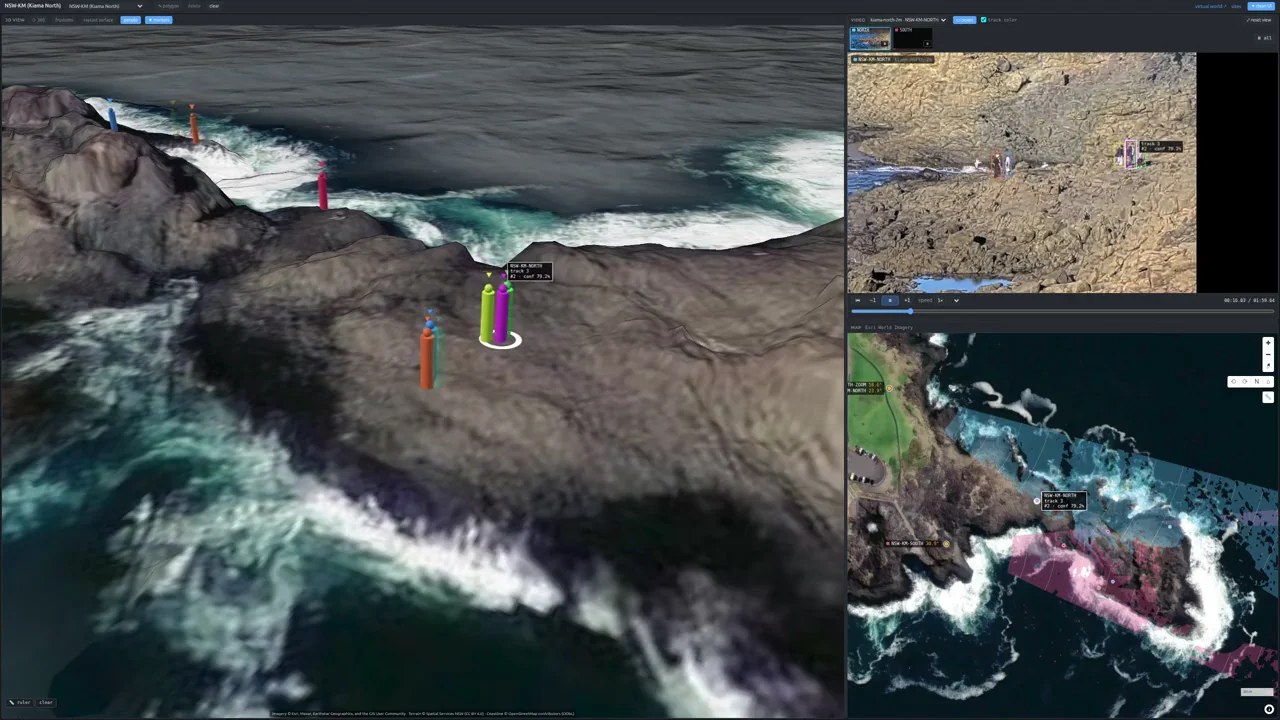
See the connected views.
Two short development recordings. No audio; the visible scene and playback speeds are described below.
Kiama / Coastal context
Look for the camera scene, tracked people and where those observations sit in the coastal environment.
Marina del Rey / Harbour context
Look for the vessel movement, recorded camera view and map. The camera view is playing at twice its original speed.
These recordings illustrate the available views. They do not show the outcome of an operational incident or establish a general performance benchmark.
One event, several useful views
A camera tells you what was visible. A track shows movement over time. A map and a 3D scene help explain where that movement belongs. ResQTwin development work brings these views into shared spatial context.
The purpose is practical: help a person move from an observation to its surroundings and supporting material, while keeping the source and timing understandable.
What the coastal recording shows
The eight-second Kiama segment brings recorded camera footage, tracked people and the coastal scene together. Camera playback is 1×. This demonstrates connected views; it is not a new incident report or a measure of detection accuracy.
What the harbour recording shows
The 13-second Marina del Rey segment connects recorded harbour footage, vessel movement and map context. Camera playback is 2×, as labelled in the recording. It shows development work, not a live customer harbour deployment.
From a demonstration to a useful deployment
Start with the operator’s task. Which place needs to be understood? What observations are available? What does the receiving team need to check before deciding what follows?
- Inputs: identify the authorised cameras and any available AIS, radar, location or environmental sources.
- Timing and gaps: agree how source times, delayed records and missing inputs will be represented.
- Outputs: define the views, records and integrations the team needs.
- Acceptance: evaluate representative conditions, the usefulness of the information and the operator’s review workflow.
Site exploration, replay and configured simulation have their own scope and validation requirements. A completed demonstration does not make every integration available in every deployment.
Explore the work
The Platform page explains the digital twin alongside the models and connected sources. The maritime application walks through an illustrative zone-and-time rule; the rule is separate from the recorded harbour example.
For delivered coastal work, read the SAIL case study. To discuss a new site, bring us the decision your team needs to make.
Sources & story details
- Location
- Australia & USA